3D Bowling
- 4.7
- Rating
- 100.00M
- Installs
- Free
- Price
 Analysis by App-foxy
When I want a quick sports game that feels more physical than a simple tap-to-score toy, 3D Bowling is one of the first titles I reach for. Its central appeal is straightforward: it presents bowling in three dimensions and makes the throw feel like something I control, rather than an automatic animation that merely leads to a result. That focus gives the game a clear identity, especially on a phone where a full sports simulation would feel too heavy.
Developed by Italic Games, this free sports game has been available since June 7, 2011. It is rated for Everyone, runs on Android 5.0 or later, and its current version is 4.3. The large audience is easy to understand: it has passed 100 million installs, with an average rating of 4.7 from around 1.2 million ratings and about 86 thousand reviews. Those figures do not automatically make a game good, but they do match my impression that this is an easy title to pick up when I have only a few minutes.
Why the three-dimensional bowling view matters
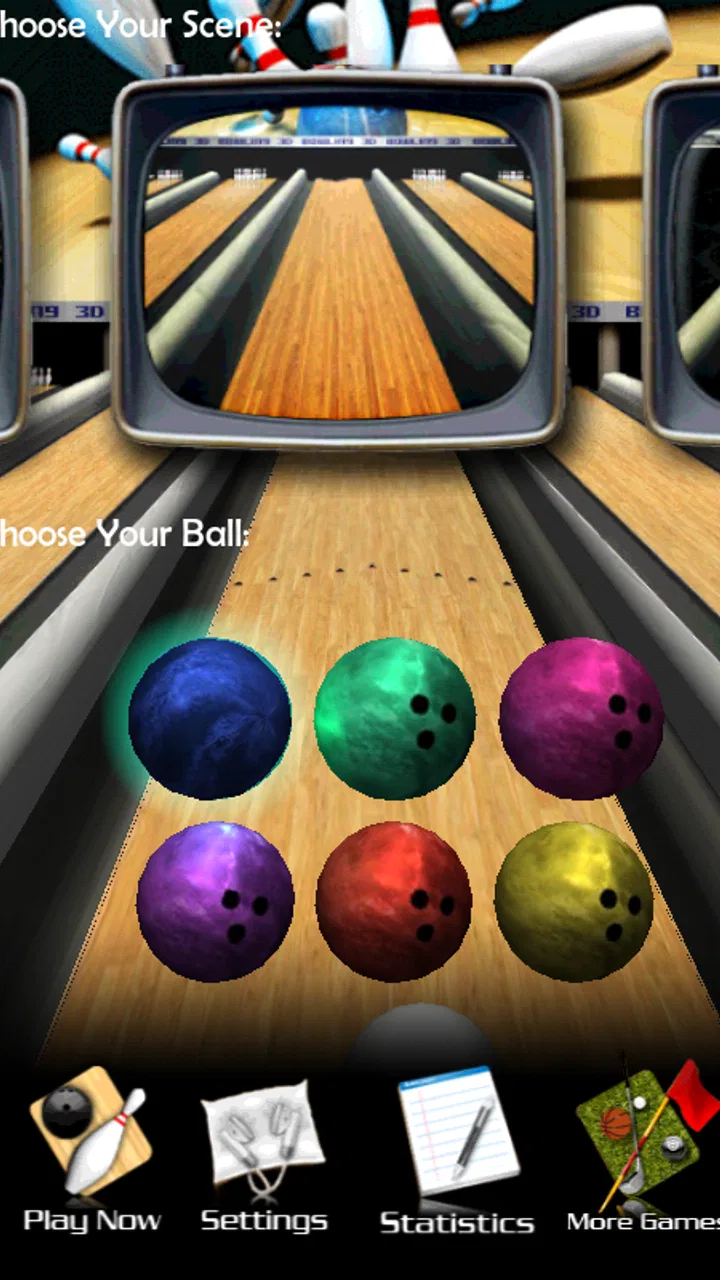
The important feature here is not simply that the lanes and pins are drawn in 3D. The real benefit is that the perspective gives the throw a sense of direction and space. I can look at the lane, decide where I want the ball to travel, and make a shot that feels connected to the arrangement of the pins. That makes a successful strike more satisfying than pressing one large button and waiting for the game to decide everything.
You May Also Like

 AccuWeather: Weather Radar
AccuWeather Review: A Quick, Clear Forecast for Everyday Decisions
For everyday plans, the best forecast is the one you can understand quickly. AccuWeather makes rain timing, radar, and local conditions easy to act on, with a few trade-offs.

 Hill Climb Racing
Why Hill Climb Racing Still Turns Crashes Into One More Run
A tiny car, a bumpy hill and one more upgrade: Hill Climb Racing keeps resurfacing because its simple chaos makes every near-miss feel personal.

 AliExpress - Shopping App
AliExpress Makes Global Shopping Feel Personal, but Shoppers Bear the Risk
AliExpress turns a global marketplace into a pocket-sized discovery engine. Its reach is useful, its shopping loop compelling, and its trade-offs easy to miss.

 Lords Mobile: Kingdom Wars
Lords Mobile Is a Kingdom-Building Routine, Not a Quick Match
A case-by-case verdict on the building, battles, device demands, and social commitments that make Lords Mobile rewarding for some players and exhausting for others.

 PDF Scanner app - TapScanner
TapScanner Makes Paperwork Easier to Capture, Check, and Share
TapScanner makes scanning with a phone feel less like a rescue operation and more like a dependable step in getting work done. Its capture tools are useful, though not flawless.

 Block Blast!
 Shows How Much a Puzzle Game Can Leave Out
A quiet grid game shows why puzzle players increasingly value instant clarity, repeatable skill and low-pressure play—and where the genre still needs to catch up.
More From Our News Desk
View All News


In practice, the 3D presentation also helps me read a mistake. If the ball drifts too far to one side, I can see that it was not just an unlucky result; my aim or release was probably off. A split becomes easier to understand because the pins occupy visible positions rather than existing as abstract targets. This is a small distinction, but it is the reason the game feels more like bowling than a generic score-chasing app.
I would not describe the experience as a full replacement for standing at a real lane. The phone screen cannot reproduce the weight of a bowling ball, the texture of the lane, or the physical timing of a genuine release. Still, the visual depth gives each attempt enough context to make me think about placement. That is the capability worth paying attention to if you are deciding whether this game suits you.
The 3D view works best when you use it to make deliberate adjustments, not when you treat every throw as a random swipe. I get more from the game when I study the pins, choose a target, and then repeat a similar motion while changing only one part of the shot. That simple habit turns short sessions into a light skill exercise.
How a typical throw feels
A normal session is easy to understand even if you have never played a mobile bowling game. I choose a lane, line up the ball, and make the movement needed to send it toward the pins. The result is immediate and readable: the ball rolls forward, the pins react, and the score gives me a clear reason to try again. There is no complicated sports rulebook to learn before the game becomes enjoyable.
The useful part is the relationship between aim and outcome. I can start by sending the ball toward the center, then experiment with a slight change in direction. When the pins fall differently, I have a practical clue about how much that adjustment mattered. This creates a compact loop of attempt, observation, and correction that works well on a touchscreen.
My advice is to avoid changing several things at once. If I alter the starting position, direction, and release motion together, I cannot tell which decision caused the result. A better approach is to keep the movement comfortable and adjust the target gradually. Even without advanced bowling knowledge, this makes the game feel less like guessing.
Another useful habit is to aim for the first contact point rather than staring only at the pins at the end of the lane. In real bowling, the ball’s path matters as much as the final target, and the three-dimensional view makes that idea easier to apply. I watch the lane line, imagine where the ball should enter the pin formation, and then make a controlled attempt. That gives me a repeatable routine for short sessions.
A practical routine for improving your score
For a casual player, I would begin with a few throws dedicated only to learning the screen response. Do not worry about a perfect score immediately. Notice how much movement produces a straight roll, how quickly a diagonal input changes the path, and whether your natural grip makes you release consistently. Once that feels familiar, aim at a specific part of the formation instead of simply pointing at the middle.
When a shot works, try to reproduce the motion rather than celebrating and immediately improvising. Repetition is particularly valuable in a mobile game because small differences in finger movement can create noticeable changes. I often keep my thumb movement shorter than my first instinct suggests. A dramatic gesture may feel powerful, but a controlled motion is easier to repeat.
For spare attempts, patience matters more than trying to imitate a strike. A remaining pin at the edge of the lane calls for a different line from a cluster near the center. I find it useful to treat the spare as a separate puzzle. The game becomes more interesting when I stop using the same shot for every situation and instead choose a path that matches the pin location.
This is one of the less obvious strengths of the title: the simple interface leaves room for self-imposed technique. It does not need a long tutorial to become engaging because the player can create a small practice system. If you want a fast distraction, you can play casually. If you want more control, you can use each frame to test consistency and lane reading.
The best everyday scenario
The strongest use case for me is a short break when I want something interactive but do not want to commit to a long match. Imagine waiting for a friend, sitting on a train, or taking a few minutes between tasks. A bowling throw has a natural beginning and end, so I can play briefly without losing track of a large campaign or leaving a complicated team in the middle of a match.
That makes it more convenient than many larger sports games. A football or basketball title often asks me to learn several controls, follow a longer sequence of play, and manage more information at once. Here, the focus stays on the lane and the next throw. I can put the phone down after a small session and return later without needing to remember a complicated strategy.
It also works well as a casual pass-and-play activity with someone nearby, provided both players are comfortable taking turns on the same device. The bowling format is naturally easy to understand: one person throws, the other watches the result, and the score provides an immediate comparison. I would choose this over a more elaborate multiplayer sports game when the goal is simply to share a few relaxed minutes.
For children, the Everyone rating and uncomplicated rules make the game approachable. I would still expect younger players to enjoy the visual reaction more than the technical side of aiming. Adults who want serious bowling practice should set their expectations differently. The game can help with basic line selection and consistency, but it cannot teach the physical mechanics of a real bowling ball or substitute for time on an actual lane.
Where the presentation helps and where it falls short
The three-dimensional perspective gives the lane more personality than a flat scoring screen. The pins have a clear arrangement, the ball has a visible route, and the impact is easy to follow. That clarity matters on a small display because I do not have to interpret a complicated interface to understand what happened.
At the same time, the visual approach is not the main reason to keep playing forever. Once I understand the basic throw, the novelty of seeing pins fall can fade. The lasting appeal depends on whether I enjoy improving my accuracy and chasing better personal results. Players who need a deep career mode, extensive customization, or a large collection of licensed venues may find the experience too focused.
I also think the game is better suited to touch controls than to people looking for a realistic hardware simulation. The screen gives me convenience, but it makes precision dependent on my finger movement and the phone’s responsiveness. Two throws that feel similar may not always produce identical results if my gesture changes slightly. That is not a deal-breaker for a casual game, but it is an important trade-off for anyone expecting tournament-level control.
Trade-offs before you install it
The biggest advantage is also the main limitation: the game concentrates on bowling itself. I appreciate that it does not bury the basic activity under a large amount of management, but players who want progression systems or a broader sports package may run out of reasons to return. This is a focused game, not an all-purpose sports hub.
Its age is another factor to consider. Having first appeared in 2011 gives it a long history and helps explain its broad reach, but it also means the experience may feel less ambitious than newer mobile sports productions. I would not install it expecting the visual complexity or feature density of a modern console-style game. I would install it because a simple, readable bowling session is useful.
The free price makes trying it easy, particularly if you are unsure whether touch-based bowling will work for you. Free does not mean every player will find it compelling, though. If you dislike repeating similar actions or prefer sports games built around teams, seasons, and long-term progression, there are better choices in the wider category. A realistic bowling focus is valuable only when bowling is what you actually want to play.
Another trade-off is the gap between visual realism and physical realism. The game can look convincing enough to make the lane feel like a place, yet the throw still depends on a touchscreen gesture rather than a real arm swing. I use it for entertainment and light practice of targeting ideas, not for developing a genuine bowling technique. That distinction prevents disappointment.
Who gets the most from this game
I think the ideal player is someone who wants a sports game that starts quickly, explains itself through familiar actions, and rewards small improvements. Beginners can understand the goal immediately, while more patient players can experiment with angles, release consistency, and spare shots. The 3D view gives both groups something useful: accessibility for the first session and enough visual information to support better decisions later.
It is especially suitable for people who play in short bursts. The free format, Everyone rating, and modest minimum requirement of Android 5.0 make it an easy candidate for a broad range of Android users. The current version, 4.3, is worth checking against your device before installing, but the basic appeal remains clear: open the game, take a throw, and decide whether you want another.
I would skip it if your priority is authentic bowling physics, a large competitive community, or an extensive progression structure. I would also look elsewhere if you want a sports game that combines several disciplines in one package. This title earns its place by doing one thing directly, not by trying to cover every possible interpretation of mobile sports.
Compared with a physical bowling outing, it is cheaper, faster, and available whenever I have my phone, but it lacks the social atmosphere and real-world feedback of a bowling alley. Compared with a larger sports simulation, it is much easier to learn and less demanding of my time, but it offers a narrower range of activity. Compared with a basic arcade game, it gives me more room to think about the ball’s path and the pin arrangement.
My recommendation after focusing on the core feature
After spending time with it, I see 3D Bowling as a dependable quick-play sports game rather than a complete bowling simulator. Its best idea is the three-dimensional lane view, because that perspective turns each throw into a visible decision about direction and contact. When I use it deliberately, the game feels more satisfying than a simple tap-based alternative.
I recommend it to casual players, families looking for an approachable activity, and anyone who wants a short game that can be understood without preparation. I would tell serious bowlers to treat it as a convenient approximation, not a training replacement. The difference is important: the app can sharpen your attention to lines and targets, but it cannot reproduce the feel of a real ball.
For me, the deciding question is simple: do you want a focused bowling game that makes the path of the shot visible? If the answer is yes, the free download is easy to justify, and the high average rating from a very large audience suggests that many players find the same straightforward appeal. If you need deep systems, physical accuracy, or constant variety, its narrow design will probably feel limiting. For a quick, readable bowling session on Android, though, it remains an enjoyable choice.
FAQs for 3D Bowling
01What are the system requirements for 3D Bowling?
3D Bowling is designed to work on a range of devices, but for optimal performance, it requires Android 4.1 or higher or iOS 9.0 or later. It occupies approximately 30 MB of space, so ensure your device has adequate storage. A stable internet connection is not needed, making it convenient for offline play.
02Is 3D Bowling free to play?
Yes, 3D Bowling is free to download and play. However, the app contains ads and offers optional in-app purchases that can enhance the gaming experience. These purchases may include additional themes or balls. Users can enjoy the core game without spending money, but purchases can add extra value.
03Does 3D Bowling offer multiplayer modes?
3D Bowling primarily focuses on single-player gameplay, allowing users to enjoy a solo experience. Currently, there is no live multiplayer mode, but players can compete with friends by taking turns on the same device. The game also includes leaderboards to compare scores globally.
04What makes 3D Bowling different from other bowling games?
3D Bowling stands out with its realistic physics and stunning 3D graphics, providing an immersive bowling experience. The game offers a variety of bowling alleys and unique balls, enhancing replayability. Its intuitive controls allow players to easily aim and throw, making it accessible to all skill levels.
05Are there any accessibility features in 3D Bowling?
3D Bowling is designed to be user-friendly, featuring simple touch controls suitable for players of all ages. However, it lacks specific accessibility options like voice commands or screen readers. The game’s straightforward design and easy-to-navigate interface make it generally accessible, but specialized features are limited.
Pros
- Realistic physics enhance gameplay.
- Variety of bowling balls to choose from.
- Smooth and intuitive controls.
- Visually appealing 3D graphics.
- Free to download and play.
Cons
- Contains frequent ads during play.
- Limited multiplayer options.
- Occasional lag on older devices.
- In-app purchases can be pricey.
- Lacks advanced customization features.

3D Bowling
Gallery